
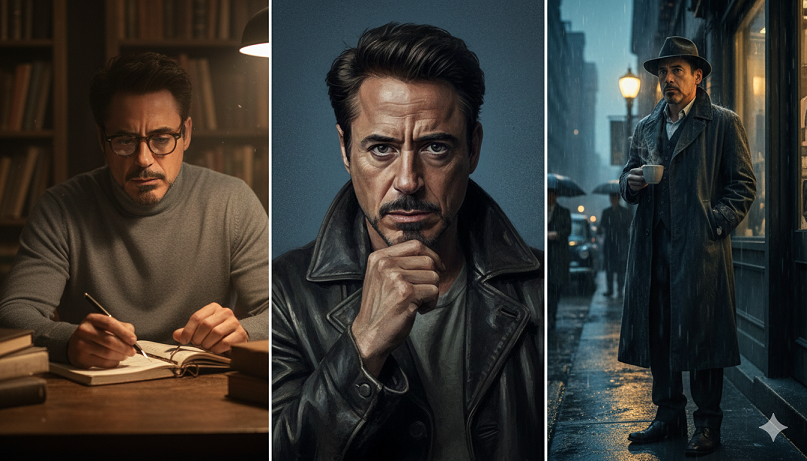
13 ChatGPT AI Photo Editing Prompts to Create Bold, Color-Rich Cinematic Portraits
To create bold, color-rich cinematic portraits, you need prompts that focus on high-contrast lighting (like Rembrandt or rim lighting), specific color palettes (teal and orange, neon, or golden hour), and technical camera details (85mm lens, f/1.4 aperture).
Here are 13 ChatGPT AI photo editing prompts designed to transform standard photos into cinematic masterpieces.
1. The Ultra-Cinematic Studio Look
“Transform this photo into a bold cinematic portrait with dramatic studio lighting. Apply rich color contrast, sharp facial details, and a soft blurred background. Use a Rembrandt lighting style to create deep shadows and a classic movie-poster aesthetic.”
2. The Golden Hour Glow
“Edit this image into a golden hour cinematic portrait. Enhance the warm sunlight, add a subtle lens flare, and create smooth skin textures with realistic golden highlights. Ensure the background has a creamy bokeh effect.”
3. Cyberpunk Neon Pop
“Apply bold neon cinematic lighting with vibrant cyan and magenta color tones. Add a soft glow effect to the skin as if reflecting nearby neon signs. Create a modern, edgy, high-contrast look with a dark, moody background.”
4. Deep Moody Noir
“Convert this photo into a color-rich moody portrait. Use a dark teal and charcoal color palette with deep shadows and intense, focused highlights on the subject’s face. Add a touch of film grain for a gritty, cinematic feel.”
5. Vogue-Style Editorial
“Edit this into a fashion magazine-style portrait. Use sharp focus, high-saturation rich colors, and professional ‘high-key’ lighting. The image should look polished, expensive, and shot on a high-end medium format camera.”
6. Vintage Hollywood Glamour
“Transform this photo into a 1940s vintage Hollywood scene. Use strong directional lighting to create iconic shadows. Apply a color palette of rich golds and deep burgundies with a subtle, warm ‘glow’ filter on the highlights.”
7. The Teal & Orange Blockbuster
“Apply a classic cinematic color grade featuring deep teals in the shadows and warm orange skin tones. Enhance the contrast and depth of field to make the subject pop against a blurred urban background.”
8. Rainy Night Reflections
“Edit this photo to look like a rainy cinematic night scene. Add realistic water droplets on the subject, glistening reflections, and blurred city lights in the background. Use cool blue ambient light with warm facial highlights.”
9. Retro Film Aesthetic (70s Style)
“Transform the image into a 1970s-style film still. Use a warm, muted color palette with rich browns and oranges. Add visible film grain, soft lens softness, and a slight vignette to create a nostalgic, timeless mood.”
10. Luxury Penthouse Lighting
“Edit this into a luxury cinematic portrait. Use soft, expensive-looking light as if coming from large floor-to-ceiling windows. Apply elegant, neutral color tones with a focus on high-resolution skin texture and sharp eye detail.”
11. Street-Style Dramatic Shadow
“Convert this into a street-style cinematic portrait. Use harsh side-lighting to create dramatic shadows across the face. Enhance the natural colors of the clothing and add an urban, gritty texture to the background.”
12. Ethereal Mist & Soft Light
“Create a dreamy, ethereal cinematic look. Use soft, diffused lighting and a pastel color palette. Add a volumetric fog effect in the background and ensure the subject has a soft, glowing rim-light to separate them from the mist.”
13. High-Contrast 8K Drama
“Transform this into an ultra-realistic 8K cinematic portrait. Maximize the contrast between deep blacks and vibrant colors. Focus on hyper-detailed textures—like individual hair strands and skin pores—to achieve a professional DSLR quality.”
Pro-Tips for Better Results:
-
Be Specific: If the AI is being too “safe,” add keywords like “High Contrast” or “Anamorphic Lens Flare.”
-
Mention Gear: Using terms like “Shot on 35mm film” or “85mm f/1.2 lens” tells the AI exactly how much background blur and “look” you want.
-
Color Theory: Use terms like “Complementary colors” or “Monochromatic blue” to force the AI to stick to a specific, professional color scheme.
Would you like me to take one of these prompts and refine it specifically for a certain type of subject (e.g., a male model, a couple, or a pet)?