
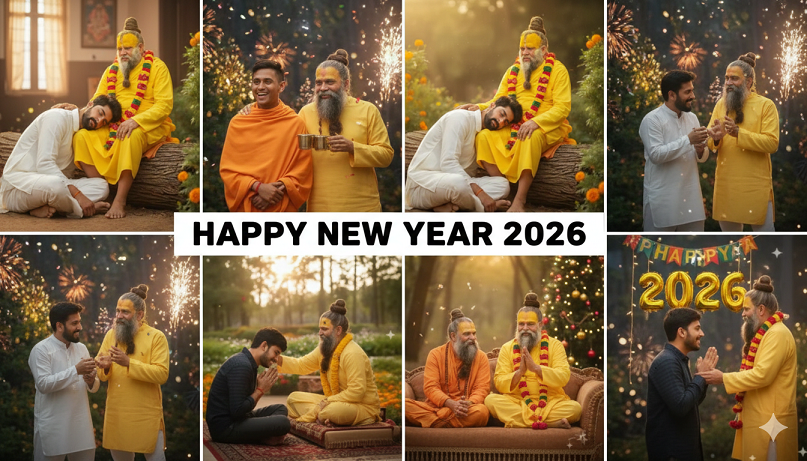
10 trending gemini Prompts Premanand Ji Maharaj Ai Photo Editing happay new year 2026
Creating high-quality AI images of Premanand Ji Maharaj has become a major trend on Instagram and TikTok. By using Google Gemini with the “Nano Banana” model (the image generation engine within Gemini), you can merge your own photo with Maharaj Ji’s image to create a seamless, spiritual masterpiece.
To use these, simply upload two photos to Gemini: one of yourself and one of Premanand Ji Maharaj, then paste one of the prompts below.
🌟 Top 10 Trending Premanand Ji Maharaj AI Prompts (2026)
1. The Divine Blessing (Cinematic)
“Create a cinematic, emotional frame merging the two attached persons. The setting is a tranquil forest at dusk with golden sunlight. The elder person (Premanand Ji Maharaj) is sitting gracefully on an old tree trunk, sharing wisdom. The younger person is sitting on the ground at his feet, looking up with a respectful smile. The atmosphere is dreamy and blessed.”
2. The Shoulder of Grace
“Merge the two provided images so it looks like Premanand Ji Maharaj is standing outdoors in a beautiful, vibrant garden. He is placing his hand on the younger man’s shoulder as a blessing. The younger man is wearing a clean white kurta with hands joined in ‘Namaste.’ Ultra-realistic, 8k resolution, peaceful atmosphere.”
3. Vintage Pinterest Aesthetic
“Create a retro, vintage, grainy Pinterest-style photo. The boy is sitting at the feet of Premanand Ji Maharaj seeking blessings. The lighting is warm golden hour with deep shadows. The boy is wearing a traditional kurta pyjama. The final image should look like an old, cherished film photograph from the 1980s.”
4. Temple Sanctum Devotion
“A spiritual photograph in front of a traditional Indian temple. On the left is the saint (Premanand Ji) in yellow robes and a white garland, smiling warmly. On the right is a young man holding a plate of offerings (laddus). The saint’s hand is on the man’s head. Background features carved stone pillars and floral decorations.”
5. The “Walking Wisdom” Prompt
“Generate a realistic photo where the attached young man is walking alongside Premanand Ji Maharaj on a path filled with fallen autumn leaves. They are engaged in deep conversation. The vibe is calm, introspective, and artistic with a soft bokeh background.”
10 trending gemini Prompts Premanand Ji Maharaj Ai Photo Editing 2026
6. Divine Study (The Guru-Shishya)
“Create an image where the young boy is sitting cross-legged on a mat, reading a sacred book. Premanand Ji Maharaj is sitting behind him, pointing at the text and guiding him. The room is filled with the soft glow of oil lamps (diyas) and incense smoke.”
7. The Yamuna Bank Serenity
“Place both attached people on the banks of the Yamuna river in Vrindavan during sunrise. The atmosphere is foggy and ethereal. Premanand Ji Maharaj is looking at the river, and the younger person is standing beside him in a meditative pose. Use soft, pastel morning colors.”
8. Modern Devotee (Street Style)
“A high-contrast, moody portrait. The younger man is in a modern black hoodie, but he is bowing his head before Premanand Ji Maharaj. A mix of modern life and ancient spirituality. Realistic lighting, sharp focus on faces, 4k detail.”
9. The Golden Glow (Close-up)
“A close-up portrait of the two people. Premanand Ji is laughing heartily and placing his hand on the boy’s head. The lighting is bright and divine, as if a light is emanating from the saint. High emotional impact, vibrant saffron colors.”
10. The 3D Pixar-Style Spiritual Art
“Create a 3D stylized, cute Pixar-style animation frame. The young boy and Premanand Ji Maharaj are sitting together on a cloud. The colors are bright and magical. It should look like a high-end 3D animated movie poster about spiritual friendship.”
10 trending gemini Prompts Premanand Ji Maharaj Ai Photo Editing 2026
💡 Tips for the Best Results:
-
Upload Two Photos: Always upload a clear photo of your face and a clear photo of Maharaj Ji.
-
Use “Nano Banana”: If you are in the Gemini app, ensure the image generation feature is active.
-
Face Consistency: If the face doesn’t look like you, add the instruction: “Keep the facial features of both individuals exactly as they appear in the uploaded reference photos.”
Would you like me to help you refine one of these prompts with your specific name or a different background?